


Building your own gaming PC has never been more accessible or more rewarding. Whether you are a first-time DIY builder or a seasoned enthusiast looking to refine your next rig, this comprehensive guide walks you through every critical decision — from selecting the right components to troubleshooting your first boot. A custom gaming PC build gives you total control over performance, aesthetics, and budget, ensuring that every dollar goes toward the parts that matter most to your gaming experience. Let’s break it all down.
Why Build Your Own Gaming PC Instead of Buying Pre-Built?
The Advantages of DIY Assembly

Pre-built gaming computers from major brands often bundle low-quality power supplies, proprietary components that limit upgrades, and inflated prices for marginal gains. When you build your own gaming computer, you choose every single part — guaranteeing compatibility, performance, and long-term value. Gaming Guides A custom PC build also gives you full control over cable management, airflow design, and cooling solutions, which directly impact thermals and noise levels during extended gaming sessions.
Beyond performance, the satisfaction of powering on a system you assembled yourself is unmatched. You learn invaluable troubleshooting skills, understand how your machine works at a fundamental level, and gain the confidence to upgrade components whenever new technology emerges. This knowledge pays dividends for years, saving you money on service calls and unnecessary replacements.
Essential Components for Your Gaming PC Build
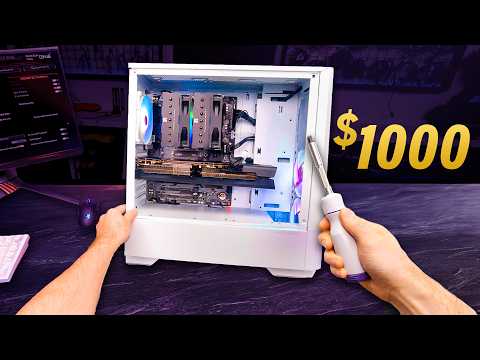
Every successful computer assembly starts with understanding what each component does and how it interacts with the rest of the system. Here are the core parts you will need, along with what to look for when selecting them.
- CPU (Processor): The brain of your system. For gaming, both AMD Ryzen and Intel Core processors deliver excellent frame rates. Current generations like AMD Ryzen 7000 and Intel Core 14th Gen offer strong multi-threaded performance for gaming and streaming.
- GPU (Graphics Card): The single most important component for gaming performance. NVIDIA RTX 40-series and AMD Radeon RX 7000-series cards deliver stunning ray tracing and high frame rates at 1440p and 4K resolutions.
- Motherboard: Choose based on your CPU socket (AM5 for AMD Ryzen 7000, LGA 1700 for Intel). Consider VRM quality, PCIe 5.0 support, and the number of M.2 slots for future storage expansion.
- RAM (Memory): 16GB DDR5 is the current sweet spot for gaming. 32GB is recommended if you multitask heavily or plan to stream while playing.
- Storage: A 1TB NVMe SSD provides fast load times and ample space. Add a secondary HDD if you need bulk storage for game libraries.
- PSU (Power Supply): Never cheap out here. Look for 80 Plus Gold or Platinum certification, sufficient wattage headroom (aim for 20-30% above your estimated draw), and a reputable manufacturer.
- Case: Prioritize airflow, fan mounting options, and ease of access during assembly. Mid-tower cases offer the best balance of space and manageability.
- Cooling: Air coolers work well for most builds, but AIO liquid coolers provide superior thermal performance for overclocked CPUs.
Step-by-Step Gaming PC Assembly Process
Step 1: Preparation and Workspace Setup
Before you touch any components, prepare a clean, well-lit workspace with an anti-static mat or wrist strap. Organize your screws, standoffs, and cables. Lay out every component and cross-reference your motherboard’s QVL (Qualified Vendor List) to confirm RAM and CPU compatibility. Having a Phillips-head screwdriver, zip ties, and thermal paste ready will streamline the process significantly.
Step 2: Install the CPU and CPU Cooler
Open the motherboard socket, align the processor’s golden triangle with the socket marker, and gently place it in without forcing. Apply a pea-sized dot of thermal paste to the center of the CPU IHS, then mount your cooler according to the manufacturer’s instructions. Connect the cooler fan cable to the CPU_FAN header on the motherboard.
Step 3: Install RAM and M.2 SSDs
Open the RAM slots’ retention clips and press the sticks firmly until they click. For NVMe SSDs, insert the drive at a 30-degree angle into the M.2 slot and press it down flat, securing it with the included screw.
Step 4: Mount the Motherboard in the Case
Install the I/O shield first, then align the motherboard with the standoffs. Screw it in carefully, ensuring no standoffs are misplaced — contact between the board and the case can cause short circuits.
Step 5: Install the GPU and PSU
Remove the necessary PCIe slot covers from the case, insert the graphics card until it clicks, and secure it with a screw. Mount the PSU with the fan facing the correct ventilation direction, then route the main 24-pin ATX and 8-pin CPU power cables.
Step 6: Cable Management and Final Connections
Route cables behind the motherboard tray for clean airflow. Connect case front-panel headers (power button, RGB, USB), SATA data and power cables to storage drives, and fan cables to the appropriate headers. Double-check every connection before the first power-on.
Budget Tiers for Custom Gaming PC Builds
Not every builder has the same budget, and that is perfectly fine. Below is a comparison of three build tiers that deliver excellent gaming experiences at different price points.
| Component | Budget ($700-$900) | Mid-Range ($1,200-$1,500) | High-End ($2,000+) |
| CPU | AMD Ryzen 5 7600 | AMD Ryzen 7 7700X | AMD Ryzen 9 7950X |
| GPU | RTX 4060 Ti / RX 7700 XT | RTX 4070 Super | RTX 4080 Super / RTX 4090 |
| RAM | 16GB DDR5 5200MHz | 32GB DDR5 6000MHz | 32GB DDR5 6400MHz |
| Storage | 1TB NVMe SSD | 2TB NVMe SSD | 2TB NVMe SSD + 4TB HDD |
| PSU | 650W 80 Plus Bronze | 750W 80 Plus Gold | 850W 80 Plus Platinum |
| Target Resolution | 1080p 60+ FPS | 1440p 60-120 FPS | 1440p/4K 120+ FPS |
Common Mistakes First-Time Builders Make
- Skipping the motherboard manual: Every board has unique layouts for headers, slots, and standoff positions. Reading the manual prevents physical damage and compatibility issues.
- Underestimating PSU wattage: A weak power supply causes random shutdowns, instability, and can even damage components. Always calculate your total system draw before purchasing.
- Forgetting to install standoffs: A missing standoff between the motherboard and case can create a short circuit that fries your board on first boot.
- Buying incompatible RAM or CPU: Socket mismatches and unsupported memory speeds are common and frustrating. Always verify compatibility lists before purchasing.
- Neglecting case airflow: A beautifully built PC with poor airflow will thermal throttle, reducing performance. Front intake and rear/top exhaust fans are essential.
Expert Tips for a Smooth Build Experience
- Install Windows on a USB drive before you start, so you can boot directly into your operating system after assembly.
- Do not overtighten screws — hand-tight plus a quarter turn is all you need.
- Test components outside the case first (the “breadboard test”) if you want to verify everything works before final installation.
- Update your motherboard BIOS before installing the CPU, especially for newer processors on older boards.
- Use velcro straps instead of zip ties for easier future modifications and cable adjustments.
Frequently Asked Questions
What is the easiest way to build a gaming PC for absolute beginners? The easiest approach is to follow a detailed build guide video on YouTube while referencing your motherboard manual. Start with the CPU and cooler on the motherboard outside the case, then install RAM and storage before transferring the board into the chassis. This “out-of-case” method gives you more room and better visibility, reducing the chance of mistakes during your first computer assembly.
How long does it take to build a custom gaming PC from scratch? Most first-time builders complete their DIY PC build in 3 to 5 hours, assuming all components are compatible and organized. Experienced builders can finish in under two hours. The time varies depending on cable management attention, thermal paste application technique, and how smoothly the BIOS recognizes every component on the first boot.
Can I upgrade individual components in my custom gaming PC later? Absolutely — that is one of the biggest advantages of building your own gaming computer. You can swap out the GPU for a newer model, add more RAM, replace the storage drive, or upgrade the CPU (provided your motherboard socket supports it). Planning for future expandability from the start, such as choosing a motherboard with extra RAM slots and M.2 bays, ensures your system remains relevant for years.
Do I need an expensive liquid cooler for a gaming PC build? Not necessarily. Most mid-range gaming processors, including the Ryzen 5 7600 and Core i5-14600K, perform excellently with a quality air cooler like the Noctua NH-D15 or Thermalright Peerless Assassin. AIO liquid coolers become worth the investment only if you are running high-end chips that generate significant heat under sustained loads or if you prioritize a quieter operation and cleaner aesthetic inside your case.
What software should I install after completing my custom PC build? After your first boot, install the latest GPU drivers from NVIDIA or AMD, then download your motherboard manufacturer’s chipset and LAN drivers. Install a monitoring utility like HWiNFO64 to track temperatures and voltages, a gaming optimization tool like MSI Afterburner, and your preferred operating system updates. These tools ensure your new gaming rig runs safely, efficiently, and at peak performance from day one.
Final Thoughts
Building your own gaming PC is one of the most rewarding projects a tech enthusiast can undertake. It combines technical knowledge, creative expression, and practical savings into a machine that is tailored precisely to your needs and preferences. By following this guide, selecting components with care, and taking your time during the assembly process, you will end up with a powerful gaming rig that delivers exceptional performance for years to come. Start planning your build today, and join the millions of DIY PC builders who have discovered the unmatched satisfaction of creating something powerful with their own hands.